
Life Sim 3D: Family Simulator
Vira Games Inc.Simulation
4.516.02K Reviews
- Version
- 2.11.6
- Installs
- 5.00M
- Age Rating
- Everyone
Screenshots





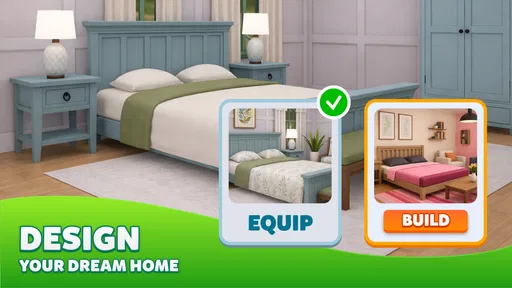

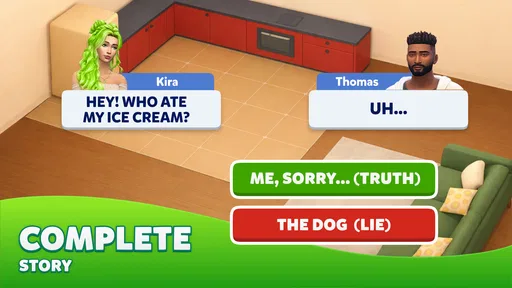
Our Review of Life Sim 3D: Family Simulator
 Analysis by Appyee
I approached Life Sim 3D: Family Simulator expecting a light family-life game, but what kept me interested was the way it turns ordinary home decisions into small creative projects. Rather than chasing action or complicated strategy, I spent my time shaping a virtual household, arranging a home, and deciding how I wanted the space and daily routine to feel. That makes it an easy game to pick up when I want something relaxed, although it also means the experience depends heavily on how much I enjoy decorating and managing a simulated lifestyle.
This is a free simulation game from Vira Games Inc., aimed at Everyone. It has already attracted over five million installs and holds a 4.5 average from roughly 477 thousand ratings, with about fifteen thousand written reviews. Those figures suggest that the concept has reached a broad audience, but they do not change the basic question I would ask before installing it: do you want a calm virtual-home experience, or are you looking for a deeper life simulator with more demanding systems?
How the current version feels to play
The current version is 2.11.2, and the game’s central appeal remains straightforward. I enter a three-dimensional family setting, work on the home, and use the available activities to make the virtual household feel more personal. The strongest part is the sense of ownership that comes from improving a room gradually instead of treating the house as a fixed background. Even a small change in layout can make the space feel more like a place I designed rather than a screen I am merely passing through.
That focus makes the game approachable. I do not need to learn a large set of rules before enjoying the first session, and the Everyone age rating fits the gentle presentation. It is suitable for players who like colorful, low-pressure simulations, including younger players who enjoy arranging spaces and adults who want a short break from more intense games. I would still supervise younger children around optional purchases, because the game is free to download but offers individual in-app purchases ranging from $0.99 to $59.99.
My first useful tip is to resist the urge to spend immediately. The best way to judge this game is to play long enough to understand what the home-building loop actually gives you. A virtual house can look attractive at the beginning, but the lasting value comes from whether the available choices encourage experimentation. I found it more satisfying to make one room feel coherent than to scatter changes everywhere simply because they were available.
A home-building loop that rewards patience
The design works best when I treat the house as a project with stages. I start by deciding what a room is meant to feel like, then make changes that support that idea. A comfortable family area, a playful space, or a tidy practical room each benefits from a different approach. This sounds simple, but it gives the decorating side more purpose than randomly placing attractive objects.
One non-obvious strength is that the game can become a small planning exercise. Before changing anything, I can look at the room as a whole and ask whether a new item improves movement, balance, or visual focus. That habit helps avoid the common problem in home-design games where every available object gets placed at once and the result becomes crowded. Players who enjoy organizing real rooms may find this surprisingly familiar.
The trade-off is that the game’s appeal is tied to repetition. If you need constant surprises, combat, or a strong narrative, the routine may feel thin. The virtual family setting provides context, but I would not approach this as a character-driven drama. Its pleasure is closer to arranging and refining a personal space than following a complex story with major consequences.
What the release and version details tell me
The game was released on May 1, 2025, and the current version is 2.11.2. That combination matters because it places the review in an early stage of the product’s life rather than presenting it as a long-established simulation with years of accumulated systems. I see the current build as a foundation: the basic idea is clear, the presentation is accessible, and the main question is how much depth the developer will continue to add around that foundation.
I would not read the version number as proof of a particular feature or improvement unless the game itself clearly presents it. A later version can reflect fixes, adjustments, content work, or several smaller changes together. What I can say from using the current build is that the core experience is already understandable without requiring a long tutorial or specialist knowledge. The evolution to watch is not simply whether the number increases, but whether new updates give existing homes more reasons to revisit them.
For a new player, this is actually a comfortable point of entry. You are not joining a game that requires knowledge of a huge back catalogue of events or systems. For an existing player, the benefit of continuing depends on whether future changes deepen the home and family routines rather than only adding more surface decoration. I would judge updates by how much they alter the decisions I make, not just by how many new things appear on screen.
How it fits into an everyday routine
A realistic use case is a short evening session after work or school. I can open the game with one modest goal, such as improving a room, checking the household, or trying a different arrangement. Because the concept is easy to understand, I do not need to reserve a long uninterrupted block of time just to remember how everything works. That makes it more convenient than many management games that punish a player for stepping away.
My preferred routine is to choose one theme for a session. On one visit, I might focus on making a shared room feel welcoming. On another, I might remove clutter and build a more practical layout. This gives the game a sense of progression even when I am not pursuing a formal objective. It also prevents the experience from becoming an endless cycle of tapping through whatever option is most obvious.
There is a useful trade-off here. Short sessions make the game friendly, but they can also make the experience feel slight if I expect major developments every time I open it. I would recommend it to someone who enjoys gentle, repeatable play. I would skip it if my ideal simulation involves detailed schedules, complex economics, or consequences that develop over many in-game days.
Where it stands beside other simulation games
Compared with a traditional life simulator, this game feels more immediately focused on the home and the visual side of family life. A larger life simulation may offer deeper relationships, careers, needs, or long-term storytelling, while this one is easier to understand because its identity is concentrated around a three-dimensional household and its surroundings. I prefer that focus when I want a relaxed creative activity rather than a second life to manage.
Compared with a pure interior-design game, the family setting gives the home a little more context. The rooms are not just empty canvases, even though decoration remains central to the appeal. In exchange, players who want extremely precise design controls or a professional decorating toolkit may find a specialist design game more satisfying. The right choice depends on whether the family-simulation atmosphere matters to you.
It also differs from competitive mobile games because there is no need for the home to prove itself against another player in the moment. That makes it less stressful, but it removes the pressure that keeps competitive games exciting. I see this as a personal sandbox first, not a leaderboard-driven challenge. If you enjoy comparing designs with friends, you may want to treat your own creativity as the challenge rather than waiting for competition to provide motivation.
Small decisions that improve the experience
The first practical approach I recommend is to take screenshots mentally, even if you never save them: pause before each major change and compare the room’s overall shape with the individual item you want to add. A visually impressive object can still make the room less comfortable if it overwhelms everything around it. Thinking in groups rather than isolated items produces a more convincing home.
Second, use a “one change at a time” rule when you are trying to understand what works. If I alter the layout, style, and room purpose all at once, I cannot tell which decision improved the result. Making smaller adjustments also reduces the temptation to spend simply because a new option looks appealing. This is especially useful in a free game with optional purchases.
Third, decide in advance whether you are playing for appearance or routine. If appearance is the goal, I can spend a session refining the home’s visual identity. If routine is the goal, I should focus on the family-life side and accept that the house may not look perfect immediately. Mixing both goals without a plan can make progress feel unfocused.
These habits reveal a limitation as well as a strength. The game gives me room to create my own objectives, but players who need clearly defined missions may feel that they are doing too much of the motivational work themselves. That is not necessarily a flaw in a relaxed simulator, but it is important to understand before downloading it.
Free access, optional spending, and device expectations
The free starting price makes it easy to test the concept without committing money first. I appreciate that approach for a game whose appeal is personal: some players will immediately enjoy building a virtual home, while others will discover that the slower pace is not for them. Trying the basic experience before buying anything is the sensible route.
The optional purchases are the main point where I would ask readers to be deliberate. A purchase should solve a specific problem for you, not simply respond to a momentary feeling that progress is too slow. I would play normally, decide whether the game remains enjoyable without spending, and only then consider whether an optional item adds enough value to justify it. For children, parental guidance is particularly sensible even with an Everyone rating.
The minimum operating-system requirement is Android 7.1, which makes the game accessible to a wide range of compatible Android devices. Compatibility alone does not guarantee that every phone will feel equally comfortable, especially in a three-dimensional environment. On an older device, I would close other demanding apps, keep enough storage available, and pay attention to whether movement or loading feels smooth before investing time or money.
One question many readers will have is whether the game is suitable for a quick, casual player. In my experience, yes, provided you enjoy self-directed decorating and family-life simulation. Another likely question is whether it replaces a full-scale life simulator. I would say no: it offers a more focused and approachable experience, but it is not the choice I would make for intricate stories, advanced management, or a highly detailed virtual society.
What existing players should expect from its evolution
Players who started near release may notice the importance of the current version more than newcomers do. New users can simply learn the present experience, while returning users naturally ask whether their established homes feel more meaningful over time. My advice is to look for changes that improve the relationship between decoration and daily family life. More objects are welcome, but meaningful interaction is what would keep a mature home from becoming a finished display.
I would also watch how the developer balances accessibility with depth. The game’s simple entry point is one of its advantages, so adding complexity should not make basic play confusing. The ideal direction would preserve the friendly home-building loop while giving experienced players more reasons to plan, revisit, and make difficult choices. That is where the game could grow without losing its identity.
There is a second issue to watch: the balance between free play and optional spending. A free simulator needs ways to support itself, but the experience remains more satisfying when creative decisions feel earned through play rather than constantly interrupted by purchase prompts. I would pay attention to whether future updates expand the free experience alongside any paid additions.
Who should download it, and who should pass?
I recommend this game to players who like decorating, gentle family settings, and simulations that can be enjoyed in short visits. It is a good fit for someone who wants to make a virtual home feel personal without learning a complicated control system. It also suits creative players who are happy to invent their own goals, such as designing a themed room or gradually giving the household a consistent style.
I would be more cautious if you want a demanding management game. The relaxed structure may not provide enough pressure for players who enjoy budgets, production chains, difficult schedules, or strategic failure. I would also suggest looking elsewhere if your main reason for playing is a rich, branching story. The family theme adds warmth, but the home-design experience is the part that carries the game.
For families, the Everyone rating makes the concept approachable, but I would still explain optional purchases before handing the device to a child. For adults, the game works best as a quiet creative break rather than a substitute for a major console-style life simulator. Knowing that distinction prevents disappointment and makes the game’s modest, focused design easier to appreciate.
My recommendation after spending time with it
Life Sim 3D: Family Simulator succeeds because it understands the appeal of making an ordinary virtual home feel like your own. I enjoyed the freedom to approach rooms as small design problems, and I found the family setting more inviting than a completely empty decorating screen. The free entry point and accessible simulation style make it easy to try, while the current version gives the game a clear base from which to develop.
Its weaknesses are equally clear. The experience can feel light for players who expect complex life management, and its long-term appeal depends on whether decorating and self-made goals are enough to keep you returning. Optional purchases also deserve careful handling, particularly on a shared family device. None of those issues makes the game a poor choice, but they do define its audience.
I would download it when I wanted a calm, visual simulation with a family-home focus, and I would recommend it to a friend who enjoys arranging spaces more than competing or fighting. I would not present it as the deepest life simulator on mobile. Instead, I see it as an approachable 3D home-and-family playground whose future will be judged by how well it turns a pleasant house into a more engaging life to manage.
Privacy and Permissions
See what permissions an app requests and how it handles your data.
- Wi-Fi connection information
- view Wi-Fi connections
- Other
- view network connections, full network access, control vibration, prevent device from sleeping, Google Play license check
Verdict
Strengths of Life Sim 3D: Family Simulator
- Easy-to-learn controls make the simulator accessible to casual players.
- Family-focused scenarios offer a change from typical city-building games.,3D environments provide a more immersive daily-life experience.
- Short activities suit quick gaming sessions on mobile devices.
- Progression gives players goals beyond simply exploring the map.
Limitations of Life Sim 3D: Family Simulator
- Some tasks can feel repetitive after extended play sessions.
- Ads may interrupt gameplay or slow down the overall experience.
- Certain content may require in-app purchases to unlock fully.
- The simulator may become demanding on older phones or tablets.
- Limited customization can reduce the sense of personal ownership.
Other Releases by Vira Games Inc.
View All
DUST: Dirt ATV Offroad Racing
Racing3.5

Dots Commander: RTS War
Strategy3.8
Similar Picks in This Category
View All
Truckers of Europe 3
Wanda Software4.3

Town Building Life Simulator
XGame Global4.2

Fidget Toys Trading・Pop It 3D
Freeplay Inc4.7

Sculpt People
CrazyLabs LTD4.4

Scary Teacher 3D
Z & K Games4.2

Hair Tattoo: Barber Shop Game
CASUAL AZUR GAMES4.3
Frequently Asked Questions
What is Life Sim 3D: Family Simulator about?
Life Sim 3D: Family Simulator is a casual life simulation game focused on managing a virtual family and handling everyday activities. You can guide characters through routines, make choices, complete tasks, and develop their home life. The experience is designed for relaxed gameplay rather than complex strategy, making it suitable for players who enjoy family-themed simulations and simple interactive storytelling.
Can Life Sim 3D: Family Simulator be played offline?
The game may allow some of its core activities to work without a constant internet connection, but certain features can depend on online services. Advertisements, optional rewards, updates, cloud-related functions, or promotional content may require access to the internet. Before traveling or playing offline, it is best to test the installed version, since requirements can vary between Android and iOS releases.
Is Life Sim 3D: Family Simulator free to download?
Life Sim 3D: Family Simulator is generally presented as a free-to-download game, allowing users to try its main gameplay without paying upfront. However, free access may be supported by advertising and optional in-app purchases. These purchases can sometimes provide resources, remove waiting periods, or unlock additional content, so parents should review device payment settings before allowing children to play.
Is the game suitable for children?
The family-friendly theme and straightforward controls can make Life Sim 3D: Family Simulator approachable for younger players, but suitability depends on the child’s age and the content shown in the current version. Advertisements, purchase prompts, and social or online elements should be checked by an adult. Using parental controls and disabling unauthorized purchases is recommended for family devices.
What devices are required to run Life Sim 3D: Family Simulator?
The game is intended for compatible Android phones and tablets, as well as supported iPhone or iPad models when an iOS version is available. Performance can differ depending on the device’s processor, memory, operating-system version, and available storage. Players should check the official store listing for the latest requirements, permissions, download size, and compatibility information before installing.
Play our best games!


